



Best Asana Alternatives in 2024



Asana Alternatives
TL;DR Summary
Motion
Best Akiflow Alternative For AI Task Planning (Assistant)

Akiflow
Best Akiflow Alternative for Mindful Planning

Morgen Calendar
Best Akiflow Alternative for Simple Tasks (Free Tier)

Amie Calendar
Best Akiflow Alternative For Aesthetic Task Planning (Free Tier)

Routine
Best Akiflow Alternative For Basic Task Planning (Free Tier)

Todoist
Best Akiflow Alternative for Simple Task Management (Free Tier)
Reclaim AI
More For Scheduling Meetings Rather Than Akiflow Alternative
Notion Calendar
Too Confusing To Be A Akiflow Alternative
Motion
Overview & Summary

Asana
Overview & Summary

Overview
Akiflow is what we'd call a task consolidation tool. Have an email to answer? Task in your project management software? Message from Slack? Well, integrate all those apps with Akiflow so you have one master to-do list. It's great for people who are working at companies using "too many pieces of software" and want one master place to look at for all their tasks. But given you're on this page, our guess is this doesn't sound like you, so let's give you some better alternatives!
The first tool to consider is Motion (it's what we use). Similar to Akiflow, Motion allows you to add in tasks but instead of you needing to manually plan your day with tasks, you just tell Motion the priority, deadline, start date, and it will automatically schedule the task onto your calendar.
What is this experience like? Well, you wake up, look at your calendar, and you see what you need to work on for that day. It's the closest thing to having and assistant. For us as a team, it more than pays for itself in the time it saves us.
Motion also is a full-blown project management software, so it's better for those who want less software. Instead of needing to use a daily planning tool + project management software, Motion does both. Motion also has team features like task dependencies, allows you to see when you're blocking others, and will let you know if team members are under or overloaded with work based on their schedule.
Another popular Akiflow alternative is Sunsama. Sunsama has a great user experience and a beautiful interface, and they have really honed in on their target market: people who love the ritual of daily planning. The people who love Sunsama most are those who come from using pen & paper for planning their tasks, and they enjoy spending 10-15 minutes mindfully planning their day. Similar to Akiflow, they have a ton of integrations with third party apps. If I was deciding between Akiflow and Sunsama, I'd go Sunsama because of their more friendly user interface.
Then you have your more barebones Akiflow alternatives like Morgen Calendar, Amie Calendar, Routine, and Todoist. All of these apps have a free tier, which might sound appealing, but you will be asked to upgrade at a point to unlock certain useful features.
Morgen & Amie are more so calendars first (rather than daily planners first). They allow you to add basic tasks or reminders on your calendar in time blocks, but they are both way more barebones than Akiflow. If you're looking for a more simple version of Akiflow, either apps are worth trying (heads up, Amie is iOS only at the moment, Morgen is Android + iOS).
Routine is a basic daily planner where you can add tasks and drag them onto your calendar, although it's still more basic than Akiflow. They are in building mode so they currently have a free tier, but unsure how long that will last.
Finally, Todoist is a Akiflow alternative if you just want an app to throw tasks in. While Todoist has a calendar view available on their Pro plan, it's also quite barebones compared to Akiflow. Todoist was always known for their simple tasks lists, and they recently introduced a calendar view due to popular demand from their customers. That said, it's a secondary feature rather than the main way folks use Todoist.
Limited Time Deal Available

$10 Free Credit
Motion
as a Asana Alternative

Sunsama
as a Motion Alternative
When to Use Motion as a Alternative
Motion isn't just a calendar, scheduler, task manager or project manager. It's really an assistant that takes all of this unique information, and uses it to build your perfect day, making it one of the best productivity tools on the market.
Motion is a great alternative for those seeking a daily planner or a project management solution.
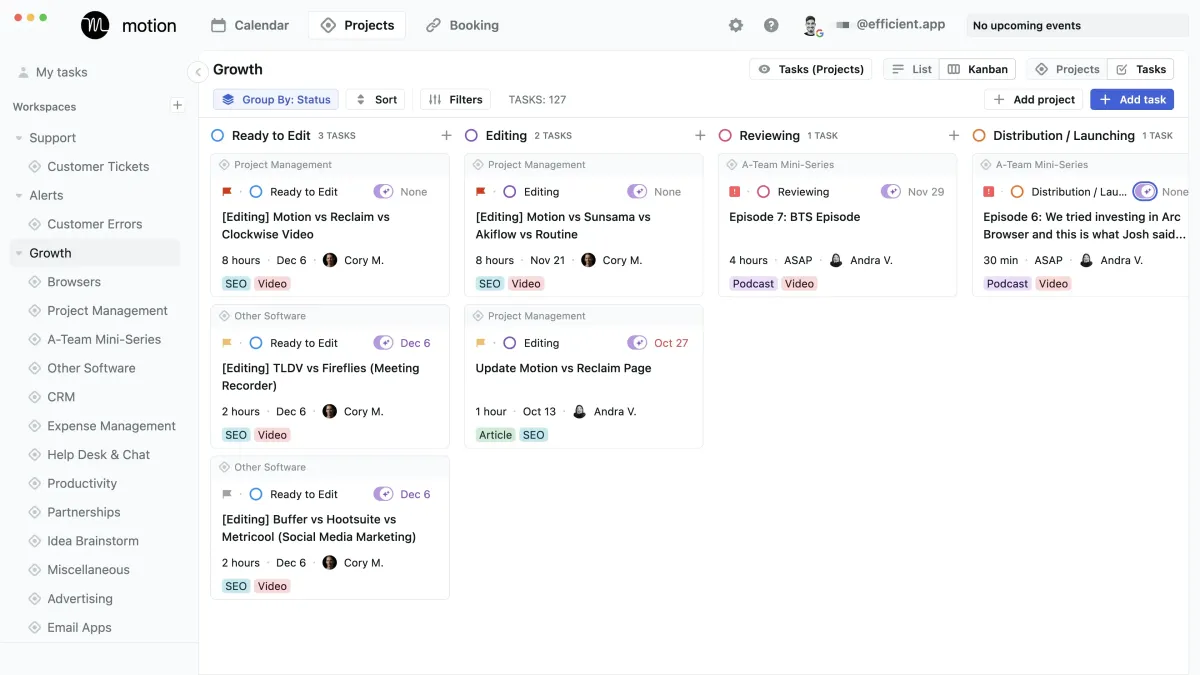
Use AI to plan your work, automatically. Be 137% more productive. Use the AI assistant for busy people and work teams.
AI Scheduling
It's differentiation comes into play with their AI scheduler that helps you plan your day (one of Motion's best features). Entering a task with Motion is easy, whether you're on your desktop app or mobile app. Simply tell Motion the task, the length of time to complete the task, the priority, the start and due date and Motion will organize your day based on what you entered and schedule tasks on your calendar into time blocks. For example, say you have a jam packed day, but and urgent task comes up. Simply tell Motion it needs to be done ASAP and it will shift all your other tasks to make space for the new task.
We personally use Motion here at Efficient App after using a myriad of tools over the years, including Asana, Calendly and Chili Piper. We love it as a project management solution, daily planner for time blocking and a meeting scheduler.
Project Management
For those seeking a project management tool that is simple (< 50 team members), we recommend Motion as an alternative to Asana, ClickUp and Monday. While with Motion, you won't get reporting or dashboards for your tasks, it's helpfulness comes into play with team collaboration as all team members have tasks auto-scheduled right on their calendar. Motion is more focused on helping teams "get more deep work done" rather than "managing the work that needs to get done".
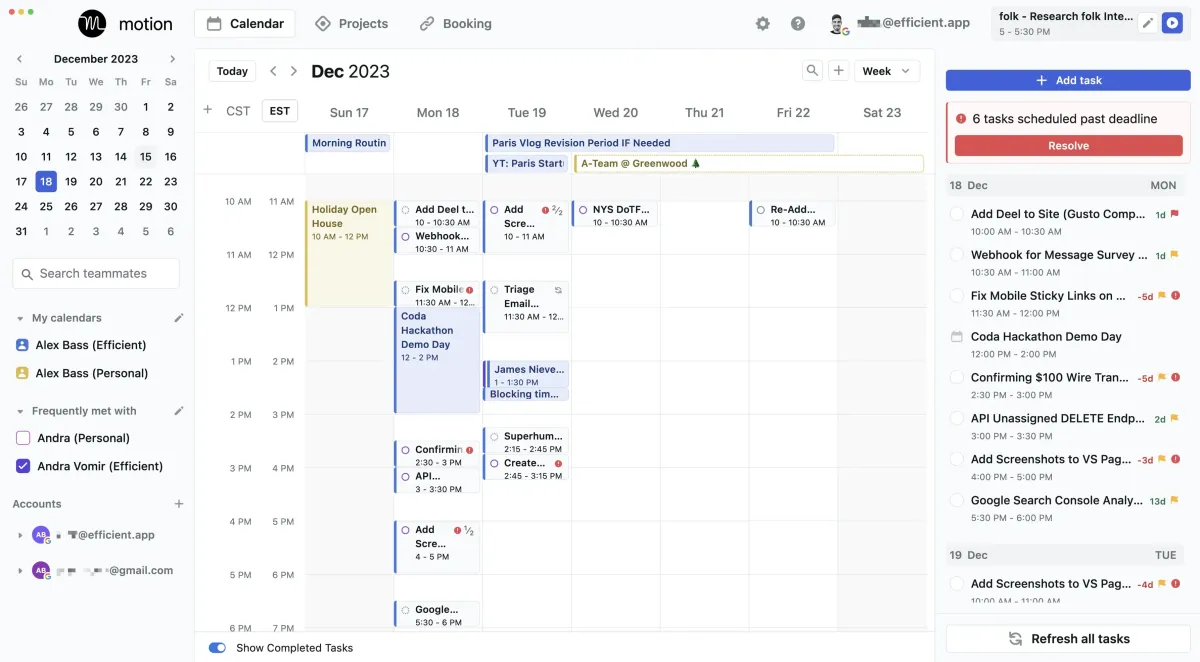
Motion calendar view with tasks auto-scheduled for the week (with time off)
Daily Planning
In the daily planning app category, Motion app has the most differentiation as it leverages the AI scheduler. Other tools like Sunsama or Akiflow are for those who want to manually plan their tasks onto their calendar, while Motion is more for the "hands off" type of folks who just want to show up to start their work day and see what's on the agenda to get done.
Meeting Scheduler
Motion's meeting scheduler makes it easy to share your availability with others to allow others to book meetings with you. If a new meeting is booked in, your daily tasks will be automatically re-scheduled around your new meeting. Viola! ✨
Overall, Motion is our top choice for an alternative to consider.
Limited Time Deal Available
Free Motion Setup Course



Motion vs Asana: Deep Dive Comparison
. Akiflow
as a Motion Alternative
Sunsama
Overview & Summary
When to Use Sunsama as a Alternative
unsama is a productivity tool that fits into the daily planning app category. It has a beautiful minimalist design, integrates with other software you may use (like Asana, ClickUp, Monday, Notion) and allows you to manually and mindfully plan your day.
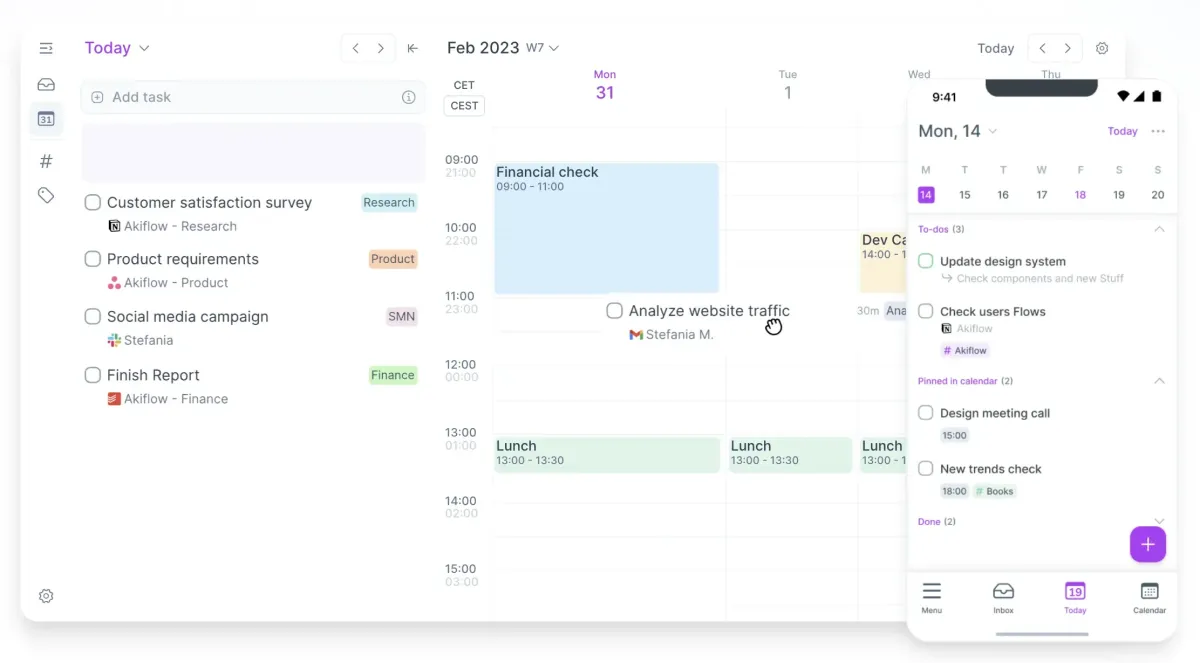
A daily planner tool to help you centralize your schedule.
Mindful Planning
All of Sunsama's best features are built around the thesis of helping you have more of a life balance and intentionality throughout your day. The app has specific features like planned time vs available workload time, that even warns you if you've over-extended yourself with tasks for the day. Sunsama also has a shut down routine that helps you intentionally plan your upcoming days with any uncompleted tasks.
Focus Mode
Another point of differentiation is Sunsama's focus mode. Focus mode expands across your task list so that you only see the single task you are working on. You can also run a timer for time tracking against the task you are working on. This allows you to see the accurate actual time it took to complete a task, compared to your original planned time. The idea is that with using this feature frequently will help you estimate tasks more accurately and plan more reasonable workdays as a result.
Plan Your Daily Tasks
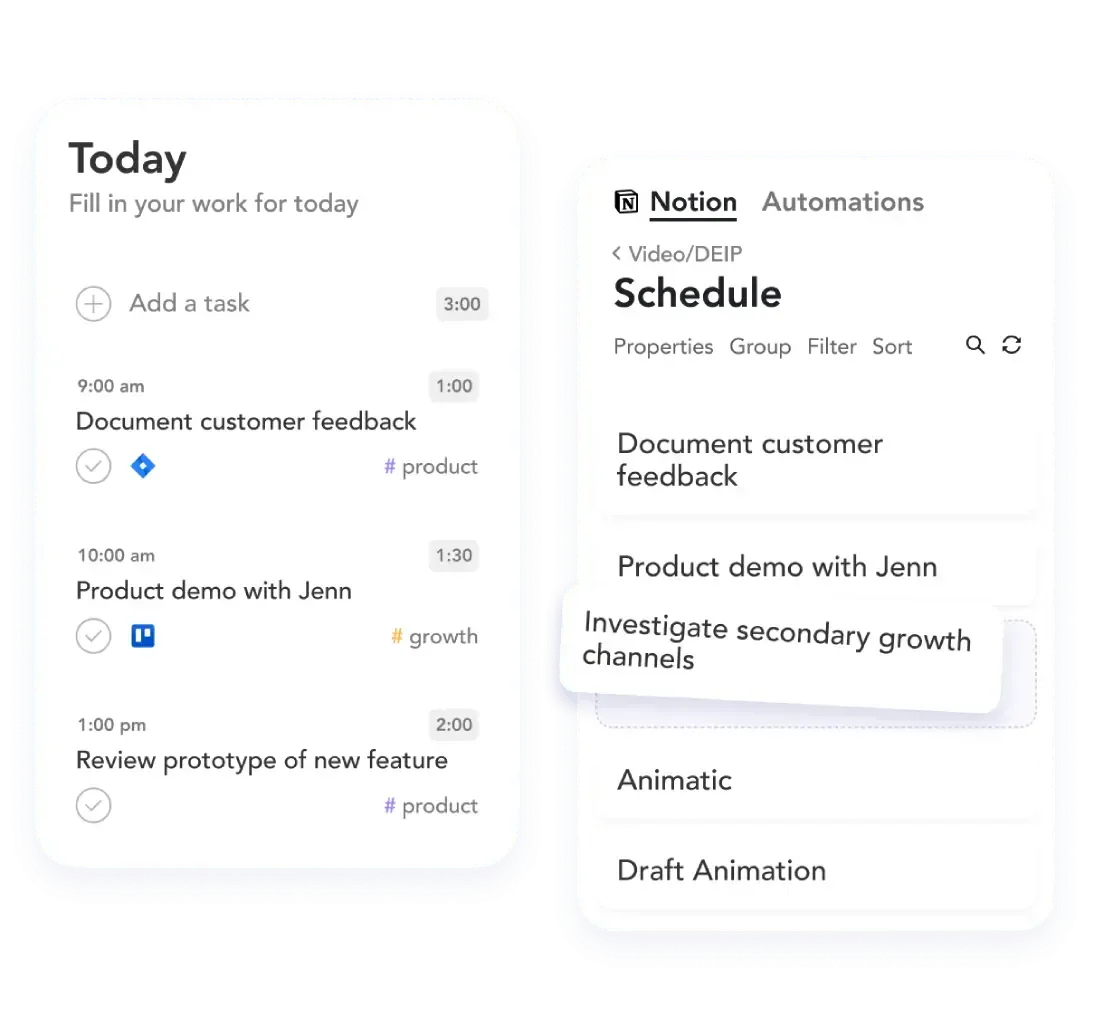
Sunsama (similar to Akiflow) encourages you to plan your tasks manually into a kanban view. You can also drag and drop tasks onto your calendar for time blocking. The team has been vocal about not leveraging AI to help auto-schedule any tasks as they value the intentionality of planning and reflecting on your day.
If you are someone has been using pen and paper for your time management, Sunsama could be a great digital planner option as it's not too overwhelming to use. If you enjoy the idea of manually and intentionally planning your day, we'd encourage you to consider Sunsama.
Limited Time Deal Available
14→30–Day Extended Free Trial

Asana vs Sunsama: Deep Dive Comparison
Asana
as a Motion Alternative
Monday
as a Asana Alternative
When to Use Monday as a Alternative
Monday as Project Management Alternative
Monday.com markets itself as one of the best all-in-one project management tools. Monday has done a good job at giving Asana a run for their money when comparing Monday vs Asana head-to-head. Monday.com has built robust project management features that an enterprise can use, yet they also really hit the ground running with amazing marketing to appeal to the average business owner.
Many folks are drawn to Monday because of their great marketing, pretty user interface with lots of vibrant colors that seem to make project management more fun. But in reality, like Asana, it's not a super opinionated project management software tool, meaning that you can "set it up however you want" which can be confusing for an average business that doesn't have a dedicated project manager on their team.
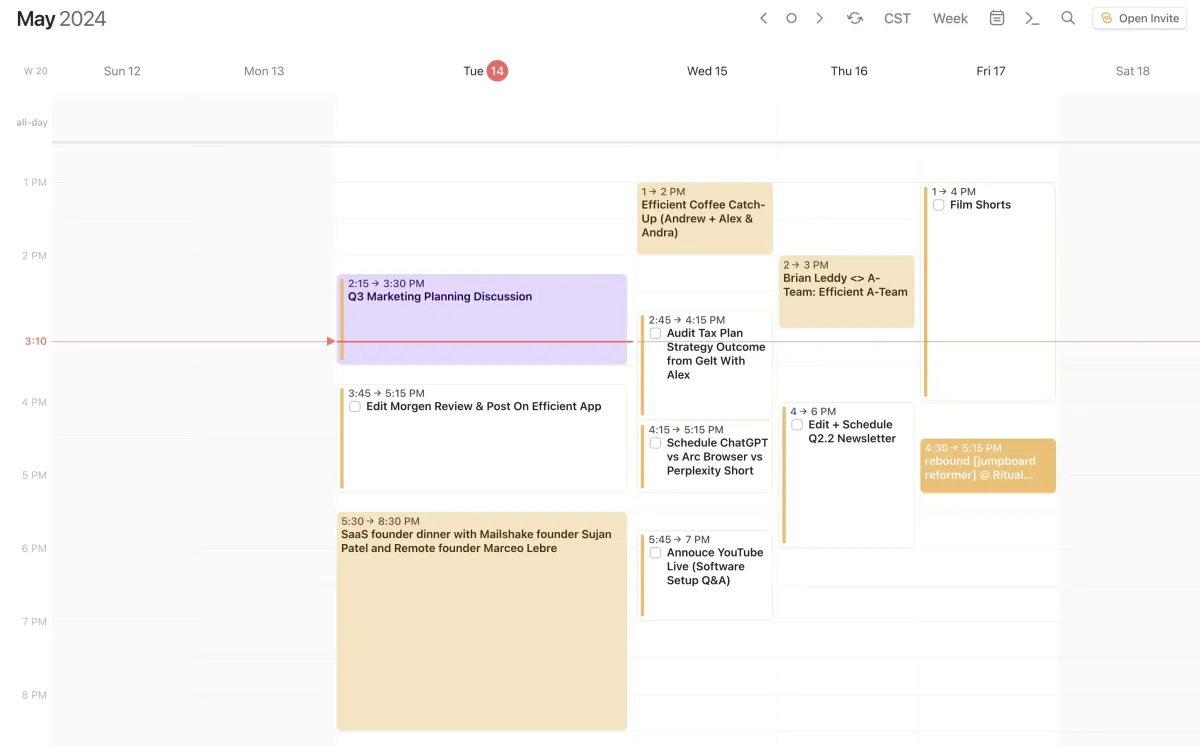
Turn to-dos into daily action plans.
Complex Projects
Monday has highly customizable workspaces and dashboards and because of this can accommodate super complex projects. For example, teams that want advanced project management features like risk registers, RACI charts, retro logs, submittal/RFI/ASI logs, dashboards for PMO-Level, and file versions would enjoy Monday. Monday also has a ton of native integrations with third party tools like Slack, Google Sheets, Jira, and Salesforce among many others.
Visual Project Tracking
With Monday, you'll get all your typical task list views that other project management tools offer, including gantt charts, and calendar views. Also, dashboards can be customized with various widgets for more dynamic reporting and data visualization, offering a more comprehensive overview of project metrics and insights.
Time Tracking
Monday and ClickUp are the two project management tools that offer native time tracking. While we prefer dedicated apps for time tracking, (like Harvest), if you're looking for a project management tool with time tracking, Monday would be an Asana alternative to consider.
If you're looking for a more traditional project management tool as an Asana alternative, check out Monday.
Get started with Monday for free.
Monday as a CRM Alternative
Monday is first and foremost a project management software, but in their efforts to gain more market share, they expanded into the CRM category. The main reason someone may want to use Monday as a CRM is if they are already using Monday for project management, and want to stay within the Monday ecosystem. Because the CRM + project management software are built by the same company, they integrate seamlessly which is the main benefit.
In general, we don't recommend Monday as a CRM as you're going to get a much better experience with a tool that was built primarily to be a CRM (not an after thought). You'd be much better with the other CRM alternatives listed here, including Copper, Pipedrive, HubSpot or Salesforce (enterprise).

Motion vs Asana: Deep Dive Comparison

Asana vs Monday: Deep Dive Comparison

Reclaim AI
as a Motion Alternative

ClickUp
as a Asana Alternative
When to Use ClickUp as a Alternative
ClickUp positions itself as one of the best all-in-one tools for productivity, integrating project management with document creation, goal tracking, time tracking, and even an email inbox. This comprehensive approach is more extensive compared to it's alternatives, Monday.com and Asana.
The project manager for large teams looking for an all-in-one task and documentation tool.
All-In-One Tool
Instead of just focusing on project management, ClickUp tries to offer all the features that a small/medium business may need to manage projects. This includes a built-in document and knowledge base system (ClickUp Docs), time tracking, mind maps (giving you the ability to map projects visually which helps with brainstorming), and even a screenshot or recording feature. While all these features may seem appealing initially, because it does so many things, it doesn't do any of these one things particularly well, or at least no where near as well as a tool built for the job.
For instance, for docs we'd recommend Slite, while for time tracking we recommend Harvest. Looking for a screen recording feature? There is nothing better on the market than CleanShotX (the ClickUp screen recorder doesn't even come close). So while at first you may be stoked to have all these tools in one place, within time you'll see their limitations and we assure you it will frustrate the team.
Customized Hierarchy of Tasks
ClickUp allows a highly customizable hierarchy of tasks, subtasks, nested subtasks, lists, projects, folders, lists, checklists and workspaces. This gives you an infinite amount of ways to set up your projects. While this may be a good thing for some, others complain that ClickUp is overwhelming to use, with too many options and features available making it confusing.
Overall, you can consider ClickUp as an alternative to Monday or Asana. Monday is more feature rich for complex projects that require a lot of reporting, while Asana is generally a more stable project management tool, with better API/Integrations.
Limited Time Deal Available
Get 20% Off Your First Year


Asana vs Routine: Deep Dive Comparison

Motion vs Reclaim AI: Deep Dive Comparison
Routine
as a Motion Alternative

Wrike
as a Asana Alternative
When to Use Wrike as a Alternative
Out of all the Wrike alternatives for project management, Wrike is often the tool favored by larger organizations or teams with complex, multi-faceted projects requiring advanced project management features and deep customization. Wrike is more of an enterprise-level project management tool (think similar to the Salesforce of project management).
While Monday and Asana are more user-friendly in terms of their user interface, Wrike's interface has a steeper learning curve due to its extensive features.
The project manager for large teams looking for an all-in-one task and documentation tool.
Integrations
Wrike’s integrations are particularly beneficial for enterprise-level software ecosystems, think Salesforce, Adobe Creative Cloud, Jira, SAP, ServiceNow, and Tableau.
Reporting & Analytics
Wrike has an edge in advanced reporting and analytics compared to Asana and Monday.com, offering detailed insights that are crucial for large teams and complex projects.
In summary, unless you're an enterprise company, do not consider Wrike. If you're a team with under 1000 employees, Wrike alternatives like Asana or Monday will be much better suited for your team.

Asana vs Amie Calendar: Deep Dive Comparison

Motion vs Routine: Deep Dive Comparison
Notion
as a Motion Alternative
Sunsama
as a Motion Alternative

Notion
as a Asana Alternative
When to Use Notion as a Alternative
Notion is part of a category of apps often referred to as an "all-in-one", for which we aren't particularly fans of.
The main problem we have with this is it feels more like a cop-out when asked to define what you are—we do everything.
Notion is first and foremost a knowledge base app, or a more simply put, a more advanced note taking app.
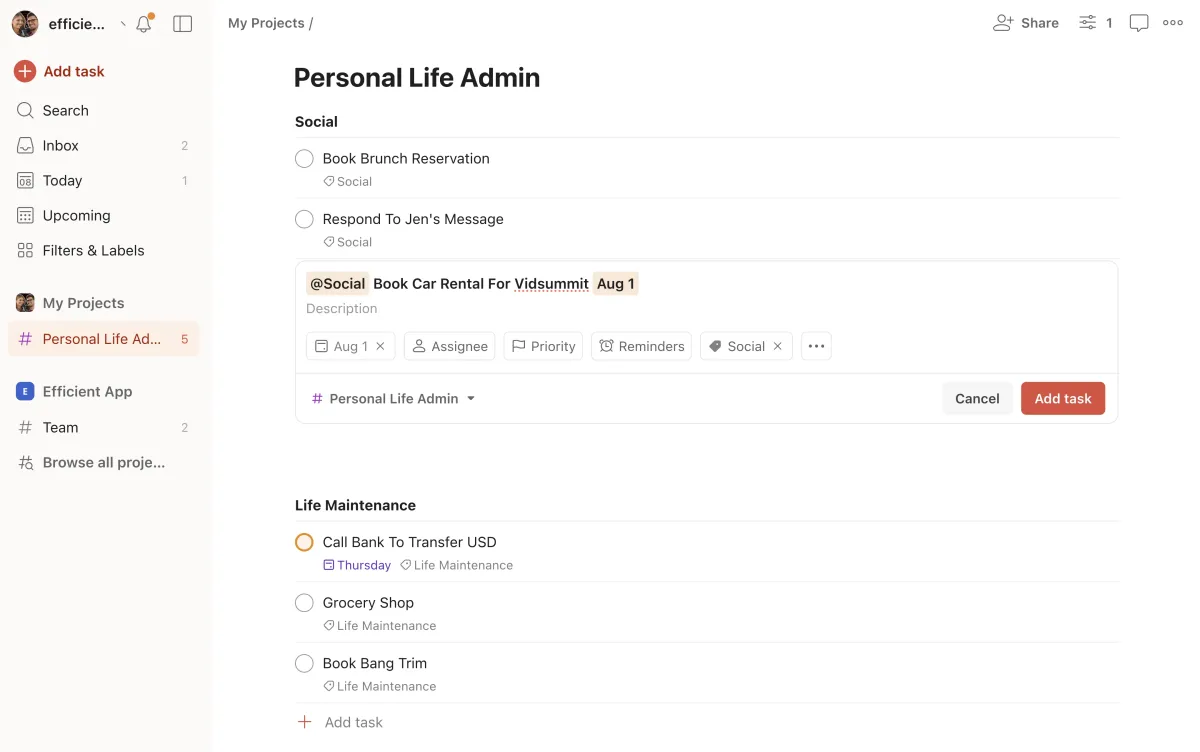
The project manager for large teams looking for an all-in-one task and documentation tool.
Notion as Project Management Alternative
Because of Notion's flexibility, you are technically able to use it for task management or project management but in terms of functionality, it doesn't compete with the likes of Motion, Sunsama, Akiflow, Asana, Monday, ClickUp, etc.
Those who tend to lean towards using Notion for any sort of task management or project management tend to be more technical and like "building tools". This means that the majority of time spent is building the task management tool, rather than...you know, just getting your work done 😄 Therefore, it takes the productivity out of productivity app for most teams.
We'd say you're better off with any other alternative listed other than Notion in this category.
Notion as CRM Alternative
Because Notion can technically be customized to "be anything", some use it as a CRM—although we don't recommend it for this category either. While Notion can be used for basic contact management, it lacks proper CRM features like email integration (one of the main features of a proper CRM). A CRM should ingest all your teams emails, so that anyone at the company can view communication history, making it useful for sales and customer support teams especially.
Further, trying to use Notion as a CRM will likely lead to poor adoption for the team, especially since it has little guardrails and the setup and configuration of how it use it falls on one person at the company (typically someone with little product experience).
All this being said, if you're tempted to use Notion as a CRM, check out folk instead. It offers a minimal learning curve and you can likely be up and running, using it within the day.
Limited Time Deal Available
2 Free Months of Pro

Asana vs Todoist: Deep Dive Comparison
Motion vs Notion: Deep Dive Comparison
Other Notable Asana Alternatives
Trello as an Alternative
Trello is known for it's signature use of kanban boards, lists and cards which provides a visual way to organize tasks. Because of it's simplicity, it's one of the most well-known task/project management tools on the market.
Trello is what we'd consider a "project management tool for beginners" due to it's gentle learning curve. It might be useful if you are just wanting a free tool that can help quickly help you start to visualize your process. But you'll likely outgrow it very quickly.
While Trello was the first app to visualize your projects in a kanban view, this feature is now widely adopted among almost every project management tool on the market. We used Trello here at Efficient App for years, before ultimately switching to Asana, when they too added kanban functionality, as we felt that Trello sort of got a bit stuck, while their competitors were evolving and working to further innovate in the project management space.
Because Trello's stagnation, it's not an alternative we'd highly recommend, simply because there are much more innovative tools on the market now (most of which are listed in this article).
Airtable as an Alternative
Airtable is a database (you can use it as a replacement to Google Sheets for example). Because of it's versatility, some folks get excited about the idea of what Airtable can do since it is almost endlessly customizable.
Airtable as Project Management Alternative
Because of Airtable's flexibility, you are technically able to use it for task management or project management but in terms of functionality, it doesn't compete with the likes of Motion, Sunsama, Akiflow, Asana, Monday, ClickUp, etc.
Airtable won't work well as a project management for complex projects, it will easily become confusing to navigate. While Airtable might work for very basic project management if you're a super small team (1-3), the time you spend setting it up and figuring out "how to best use it" is better spent on actually getting your work done. With that, using another alternative on this list that is more opinionated in terms of project management and has more features pre-built for managing projects, will be a much better choice long-term.
Airtable as CRM Alternative
Airtable is not a traditional CRM software, it's first and foremost a database (you can use it as a replacement to Google Sheets for example). Just like some people use Google Sheets as a CRM, you can also "technically" use Airtable as a CRM—though it's not something we ever recommend.
The reason is because Airtable lacks the main features of a CRM, like ingesting all your teams emails in one place. Further, because there is unlimited flexibility with Airtable, you can get stuck spending dozens, if not hundreds of hours, configuring Airtable to function as a CRM. And more likely than not, the tool will lack proper adoption as there are little guardrails when using the tool for CRM purposes and everyone can kind of use it "how they want".
In general, while Airtable tries to position itself as a contender in the CRM space due to it's customization abilities, it's the main reason why we advise teams not to go down this path. It will likely lead to overwhelm and sunken time that could have gone into setting up a proper CRM that will scale with time.
If you're tempted to use Airtable as a CRM, we'd recommend folk instead as it will still give you a similar database like structure, all while providing CRM features at the core.
Subscribe to Our New Letter
Popular Comparisons
Top Project Management Software
Top Daily Planner Software
Top Email Clients
Top Productivity Software
Top CRM Software
Top Browser Software
Top Time Tracking Software
Top Help Desk Software
Top Expense Management Software
Top Calendar & Scheduler Software
Top Knowledge Base Software
Top No-Code Builder Software
Top Website Builder Software
Top URL Shortener Tools
Top Payroll & Benefits Software
Top Social Media Management Software
Popular Alternatives
Motion Alternatives
Sunsama Alternatives
Akiflow Alternatives
Asana Alternatives
HubSpot Alternatives
Pipedrive Alternatives
Copper Alternatives
General
About
Newsletter (Subscribe)
Customer Success
Stories
App
Top Picks
Software Discounts
Software Stacks
Podcast
Videos
Blog
Privacy Policy
Terms & Conditions
©2019–2024 Efficient App