
Project Management > Motion vs Notion
Motion vs Notion


Motion vs Notion
TL;DR Comparison
While Notion is a great team knowledge base, it does not have the organization and capabilities needed for effective project management.
When many teams spike Notion for task and project workflows, they do not end up sticking with it and fall short on making the most of its capabilities.

Motion is a better choice for teams that want to manage their team and streamline their workflows.
Assess wisely which tool truly supports your purpose.
Battle of Concepts:
Is Motion or Notion Better?
Comparison Verdict
What brings you to this Motion vs Notion comparison? Chances are, you’re looking for the best solution for project management. While Notion is often marketed as an “all-in-one” project management tool, it was originally designed as a team knowledge base. This creates some confusion about its true capabilities.
Both Motion and Notion offer task and project management features, but Notion falls short as a dedicated project management tool. Its strengths lie in organizing team knowledge, not managing complex projects.
By the end of this article, you’ll have a clear understanding of the key differences between these tools and know whether Motion or Notion is the better choice for your needs. ⤵
Motion vs Notion: Understanding Their Core Differences
The main difference is in their focus — Motion vs Notion for project management. Motion is ideal for an AI assistant to manage time and tasks for individuals and teams. Essentially, it is a full-blown project manager that reorders your tasks and calendar automatically according to what you need most based on priority and time. Missed a task? Not an issue — Motion automatically deploys it for your next earliest opening so nothing gets lost in the shuffle So, it is excellent for Motion time management & workflow automation.
👉 Well, you can start free 7-day free trial of Motion right here!
Whereas on the other hand, Notion has become a little all in one note-taking and team knowledge base tool. Its flexible database structure (think Airtable), means it often gets repurposed.
If you are using Notion for internal documentation and thinking of adding your team tasks on top of it, maybe getting the Motion API or Zapier to bridge Motion with it is a good idea. Though you need to understand whether such integration is beneficial for your project management requirements. If you prefer time blocking and task tracking, Motion vs Notion for team collaboration may in some cases be a good match.
👉 Sign up for Notion free trial here.
Before getting into more specific categories and comparisons between how Motion stacks up against Notion works (such as in task tracking, notion motion use cases in education & much more), here is a brief overview of both. ⤵
Which Tool Reigns for Project Management?
Winner: Motion
The functional comparison of Motion vs Notion for project management is huge. Motion is build as the project and task management tool with one the best integration with your calendar, time-blocking features, and AI scheduling feature. Motion offers a major benefit for teams and individuals looking for an all-in-one tool to help them get fefset with granular tasis or improve workflows.
Motion lets you break down large projects with multiple-month deadlines into actionable sub-tasks, so both large-scale project management and day-to-day work are quick and easy processes. It also provides a straightforward way of assigning tasks to team members, flagging potential blockers and resolving issues. Motion is better suited for people wrestling with more complicated projects that require long-term planning, as it offers automatic task tracking and workflow automation that work wonders from an enormous project management standpoint.
When dealing with small size tasks and projects, Motion offers a friendly way for a user to make a schedule. It is as simple as assigning relevance, duration, and dependencies, then Motion will create a perfect schedule that is most efficient for all the work that has to be done. Its scheduling tool AI not only remembers you all the tasks and progress that you have made, but it also helps you to do time management in the most efficient way. Have you failed to finish a task for a day? The program will ask you for the next available time slot to reschedule the task, and no further input from you will be required.
Notion is a platform that is both powerful and flexible with its database structure and templating features, but it doesn't possess the tools to be a fully functional project management tool like Motion. The duffness of higher education results from the applications of only one tool i.e., descriptor of the notes below and a knowledge repository platform. It, however, can be a disruptive tool used for the supervision and management of a critical mass of people in any project. Otherwise, it will be abused as a high school history text. The fact that Notion lacks full integration with a calendar and time-blocking functions makes it difficult to move from simple to complex projects. For this reason, if you want to track your tasks, Notion just won't do it.
Notion is very good for users who want to create their notes. Nevertheless, when the user wants to use it for project management, the user becomes frustrated because the lack of core features like workflow automation and time management tools. Motion, on the other hand, is the place where one should go if one is looking for the kind of deep calendar integration and task scheduling that it makes it perfect for both individual and team-based project management.
To sum up, while Notion may be a suitable choice for easier, simple individual task tracking, in case of teams or more demanding project management, Motion comes with a customizable and professional like solution. The analysis of Motion vs Notion for team collaboration and task management is a clear explanation of why Motion is the more substantial one because it allows for flawless task management during the daily operations that are done by such projects.

Team Knowledge Base
Winner: Motion
Motion is a tool for project management, it is meant for taking notes on tasks to some extent but there is no team knowledge base.
On the other hand, Notion is a massively successful knowledge management tool with valuable note-taking and documentation functions useful for thorough team cooperation. If the team notes are so important, No man is the better choice.
Many people use Notion and at the same time even employ Motion to handle their task, however, integrating both is quite a bit of like a maze. As a note-taking functionality, The Notion place is evidently the better.
👉 Start your free trial of Notion here.
Motion vs Notion Innovation
Winner: Motion
Motion's project management solution goes beyond the usual task tracking - it's a real game-changer you might be looking for. A lot of platforms usually spread themselves too thin by adding fancy features like the team knowledge base or CRM, but Motion sticks to the main things project managers want like time blocking, workload management, team dependencies, and advanced task scheduling.
Regarding comparisons of Motion with Notion, Click-Up, or Monday, we see that Motion is the one driving the shift in the project management field. Despite competitors are trying to develop multipurpose tools sometimes jeopardizing their basic features, Motion is reshaping what project management should be and is all about with its AI-powered scheduling and automation components.
The sector of project management is very ready to welcome new ideas as AI is becoming an increasingly major factor. Whereas certain other tools are smug with them having it already all figured out, Motion goes all the way and creates a platform that can break the existing patterns. Even when you're working with Motion, you can already get glimpses that the main trends in project management will be here soon.
👉 Start your 7-day free trial of Motion here.
Motion vs Notion
Motion
Visit Site: Motion
Notion
Visit Site: Notion
Motion vs Notion
Overview
The Problem With Project Managers
The most well-known project management tools have many times been developed for large teams and enterprises, which, as a rule, complicates the work of little teams and can be too much.
Here’s what to consider:
These tools can prove too much to handle with the setup requiring hours of man-hours to be applied fully and configured.
The teams which pull through the implementation of these tools are those with the staff and the time to clear out the set up.
Moreover, larger groups sometimes go so far as to farm out the task of configuration to agencies, however, it is still possible for a project to flounder.
On the other hand, Motion is a simplistic platform that is more intuitive and smaller teams find it easy to work with. Hence, the problems of the cumbersome platforms, in general, will not be encountered in Motion, as everything can be dealt with easily and without an overlong setup for project management.

Motion
Summary
Limited Time Deal Available
Free Motion Setup Course
(Once Released)
Quick Summary for Motion
Motion (also known as Use Motion or Motion App) is a specialized solution that is time management-driven and differs from the other project-management-oriented platforms.
Here’s the reason behind it:
The application of Motion is aimed at every single aspect of your team's time management. Being a classical style person who starts his morning by checking your calendar, Motion will effortlessly merge into your work routine. The synchronized calendar lets you visualize your own personal and the team's
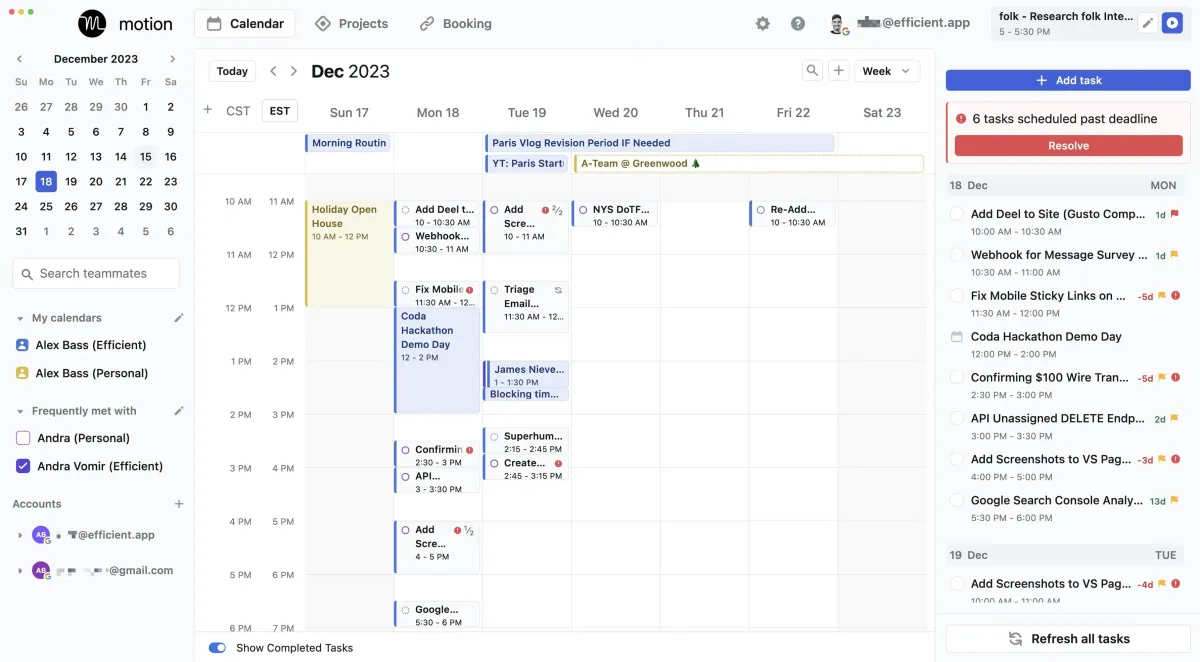
Motion Calendar App Daily Planner & Task Management Sidebar
tasks with Google, Microsoft, and Apple Calendar. Bares the burden of completing the most important tasks first by Motion who transfers those tasks directly to your calendar. The motion AI automatically calculates the time blocks and you do not even need to manually mark time for specific tasks.
Motion makes it effortless to schedule meetings by automatically generating links and syncing them with your calendar. Once a meeting is scheduled, it sends invitations to the appropriate team members automatically.
Think of Motion as a personal assistant for your entire team. It helps everyone stay focused on their tasks and ensures the schedule is adhered to. This tool reduces errors, allowing the team to concentrate on high-priority tasks at the right times.
While Motion is valuable for individuals, its true strength is revealed when used by teams. The automation features it offers are unmatched by any other project management or scheduling tool.
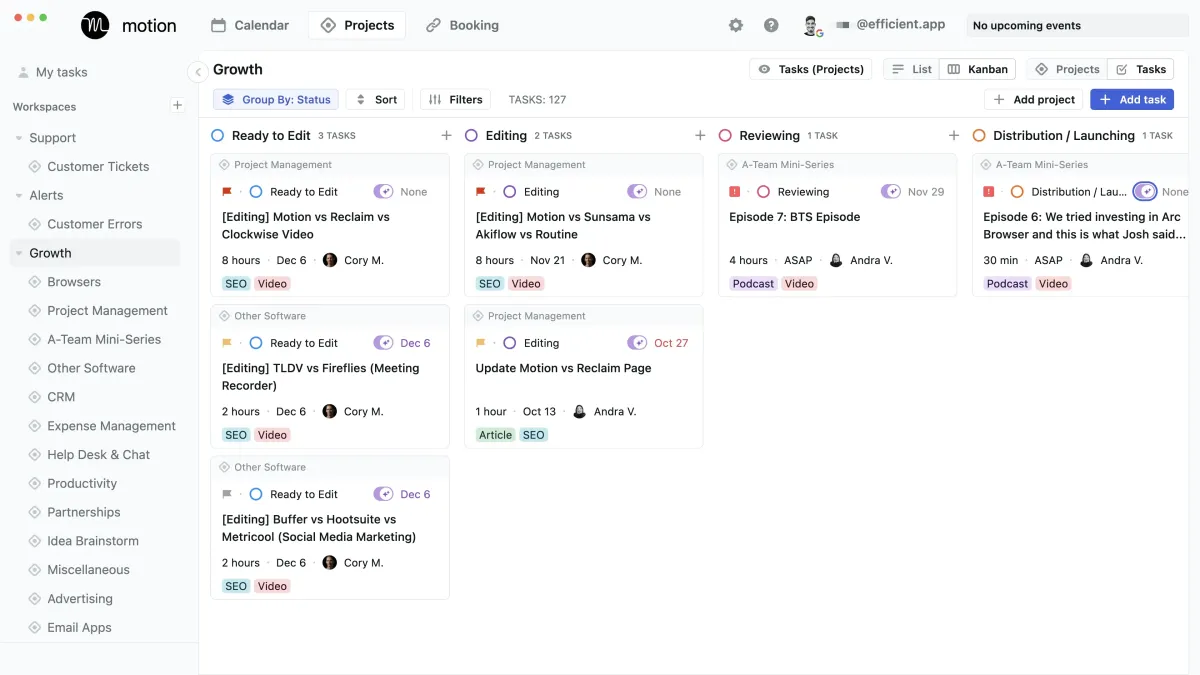
Motion App Project Management
How Motion App Compares
Project Management
As compared to some of the best project management software on the market often mentioned like Asana, Monday, ClickUp, Motion has taken their sights on slightly smaller teams of between 1–50 people.
This team size target is based on their current feature-set, from what we've seen. For example, the larger teams that we work with who have many layers of management often require reporting capabilities over everything else. And with Motion, that's not something you're going to get, because they are currently focused on giving the only AI project management tool on the market focused on helping the individual and teams, over the needs of upper-management.
So if you and your team are used to spending a lot of time planning deadlines, and rearranging your "My Task" view in the existing tools on the market, Motion flips this on it's head with the use of AI. Something to consider if you're fed up with the manual work involved with traditional project management tools.
Daily Planner
Compared to the best daily planner apps on the market like Sunsama and Akiflow, Motion is the only daily planner we've seen that actually leverages AI to plan your day for you. With all of the other apps in the category, you need to manually drag in tasks to time block and plan each day. This is an incredibly time consuming process, that some justify as being "more mindful", but once you actually have AI schedule your day for you, you realize how much time is actually wasted "mindfully planning your day".
Calendar Scheduler
Compared to the best calendar schedulers on the market like Calendly and Chili Piper, Motion bakes in the core functionality of these tools, with the added visibility of team tasks and urgent deadlines, actually booking off availability for you and your team if high priority work needs to get done by a quickly approaching deadline.
Get Motion 7 Day Free Trial.
Motion App Limitations
Custom Integration Required for Large Teams
Large teams (100–500) with other enterprise software implemented will find integrating Motion more involved than other enterprise tools. When using an enterprise software stack like that of Salesforce, it's common for other project management tools to have native integrations.
With Motion, it will require a custom integration approach (something that we actually help teams do). But while it's possible, one might ask if it's worth making the large investment in a custom integration when you might be able to get something more native out of the box with the other tools focused on larger teams.
(This of course depends on the actual integration needs of your team, as native doesn't always do exactly what you'd like it to do).
Reporting & Dashboards
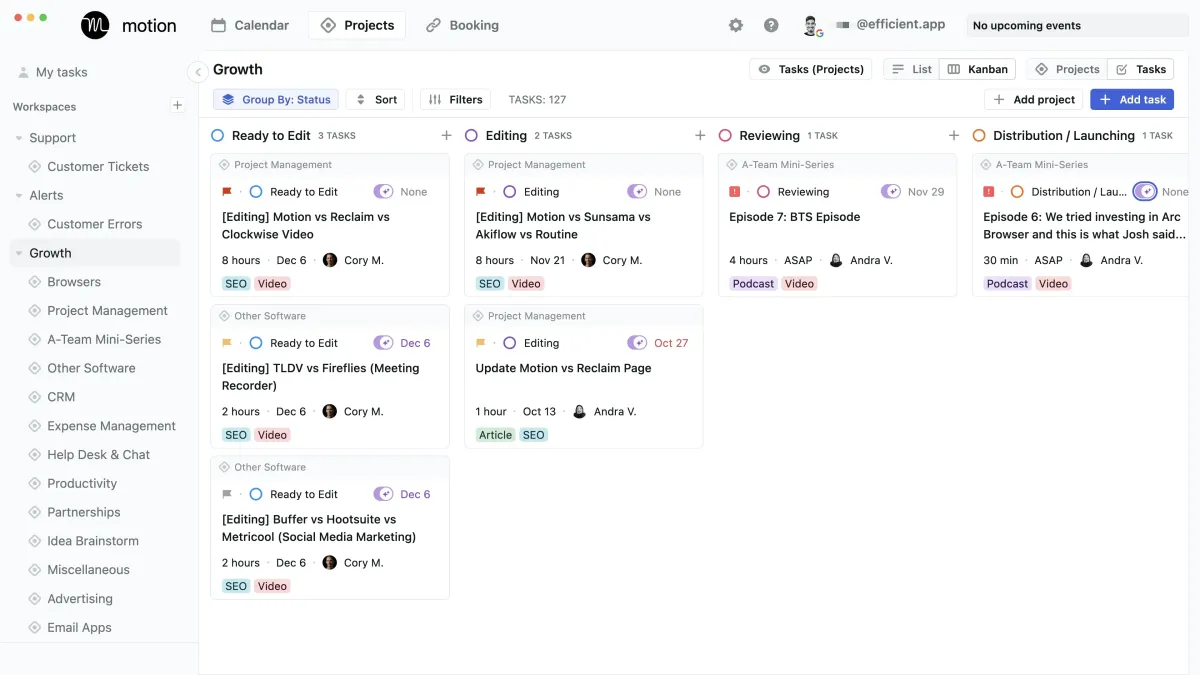
Motion currently lacks advanced reporting and dashboard functionality. So while you can see at a top-level the status of projects and tasks in Kanban and Listviews, even a team workload view, that's about where reporting dashboards end, making it less suitable for large teams requiring extensive project analytics.
Motion App Pricing
Individual (1 User)—$19/user/mo Billed Annual ($34/user/mo Billed Monthly)
Team (2+ Users)—$12/user/mo Billed Annual ($20/user/mo Billed Monthly)
View full Motion pricing tiers & features on their site
If all of that connects with you and you think it might fit your needs, they have a 7 day free trial that you can use along with your team to see what it's like having a personalized AI assistant.
Free Motion Setup Course (Once Released)
Want to learn more?
Notion
Summary
Comparison Summary
Notion positions itself as an "all-in-one" workspace tool, but that doesn't mean it's ideal for "everything."
At its core, Notion is a knowledge base or wiki, designed for documenting company processes and notes. Over time,

We regulary get emails like this.
Notion has expanded its capabilities, allowing users to link notes, create databases with formulas, and more.
How Notion Compares
Notion's versatility allows you to customize it into almost anything you need. This flexibility has led teams to use Notion as a CRM, project management tool, task manager, knowledge base, and more. However, just because Notion can be adapted for various purposes doesn't always mean it should be. We often receive feedback from teams who've tried using "Notion for everything", only to find it becoming overwhelming and messy.
Notion Limitations
If you want to use Notion, use it as a knowledge base/company wiki (or use Slite, our top pick and what we use 😉). For specific business functions like project and task management or CRM, it's usually better to opt for dedicated tools built for the job.
Building From Scratch
A huge drawback of using Notion for CRM or project management is that you're now building your system from scratch. Even with available templates, you'll find yourself investing a lot of time in learning to configure Notion and tailoring it to your processes.
In contrast, a project management tool that is developed by a team focused solely on creating the best product in that niche, will much more quickly set you up for success.
Just think about it: when you're using a project manager that was built for that function, this means that their entire team focused on building the best project manager out there. So you're already getting a tool with project management features that are useful to thousands of other businesses. While with Notion... well guess who is going to be building said features? YOU 😅
The reality is, we often hear people say "but my business is unique so I need a custom solution, which is why Notion is appealing".
After helping teams of all sizes and in many industries for over a decade, we promise you that business processes are not that unique and 95% of the time can be (and should be) mapped to the structure of existing tools.
Oh and if you're considering using Notion as a CRM, make sure to read this dedicated article as to why we don't recommend that either.
(This of course depends on the actual integration needs of your team, as native doesn't always do exactly what you'd like it to do).
Notion Pricing
Notion offers a free tier for up to 10 guests, making it accessible if you're curious about its capabilities. Notion has a free tier for up to 10 guests, so if you're curious as to what the hype is about, you can easily sign up and start playing with it yourself. If after a day you start feeling overwhelmed, you're not alone, it's more or less a blank slate after all.
Get Notion For Free.
Want to learn more?

The spend management platform for teams of all sizes (customizable virtual cards, budgeting, auto-reconciling, and expense reimbursement).
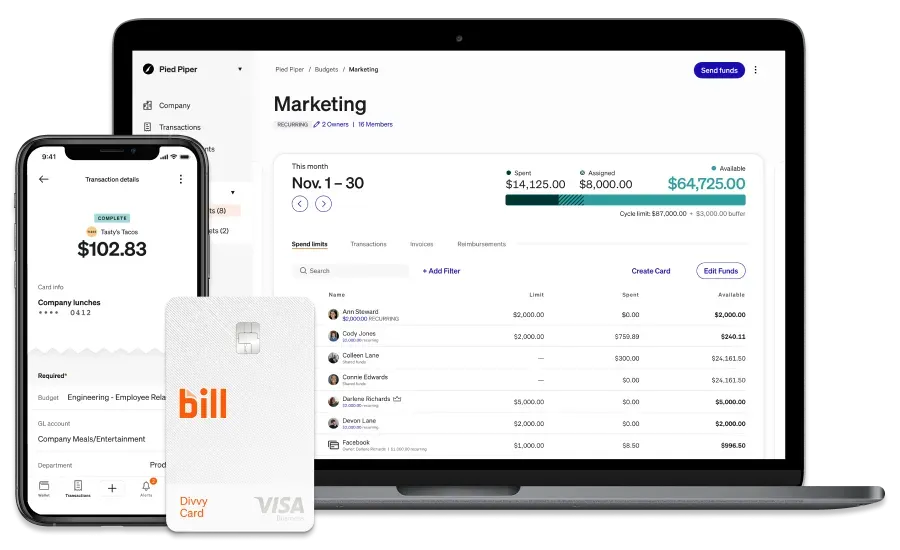
Motion & Notion Alternatives












Subscribe to Our New Letter
Popular Comparisons
Top Project Management Software
Top Daily Planner Software
Top Email Clients
Top Productivity Software
Top CRM Software
Top Browser Software
Top Time Tracking Software
Top Help Desk Software
Top Expense Management Software
Top Calendar & Scheduler Software
Top Knowledge Base Software
Top No-Code Builder Software
Top Website Builder Software
Top URL Shortener Tools
Top Payroll & Benefits Software
Top Social Media Management Software
Popular Alternatives
Motion Alternatives
Sunsama Alternatives
Akiflow Alternatives
Asana Alternatives
HubSpot Alternatives
Pipedrive Alternatives
Copper Alternatives
General
About
Newsletter (Subscribe)
Customer Success
Stories
App
Top Picks
Software Discounts
Software Stacks
Podcast
Videos
Blog
Privacy Policy
Terms & Conditions
©2019–2024 Efficient App